
RCS: the modern multimedia messaging standard
RCS for Business is transforming customer communications with rich, secure, and personalized experiences that drive game-changing results. It’s the perfect time to explore how RCS can transform your digital customer communications and help you connect with your customers like never before.
RCS – the modern multimedia messaging standard
RCS (Rich Communication Services) is a person-to-person messaging protocol which replaces traditional messaging (SMS, MMS) and offers features similar to internet messaging applications, RCS is designed to deliver better experiences across mobile devices. It is a richer, more engaging alternative to regular texting, with high-resolution images, videos, reactions, and typing indicators.
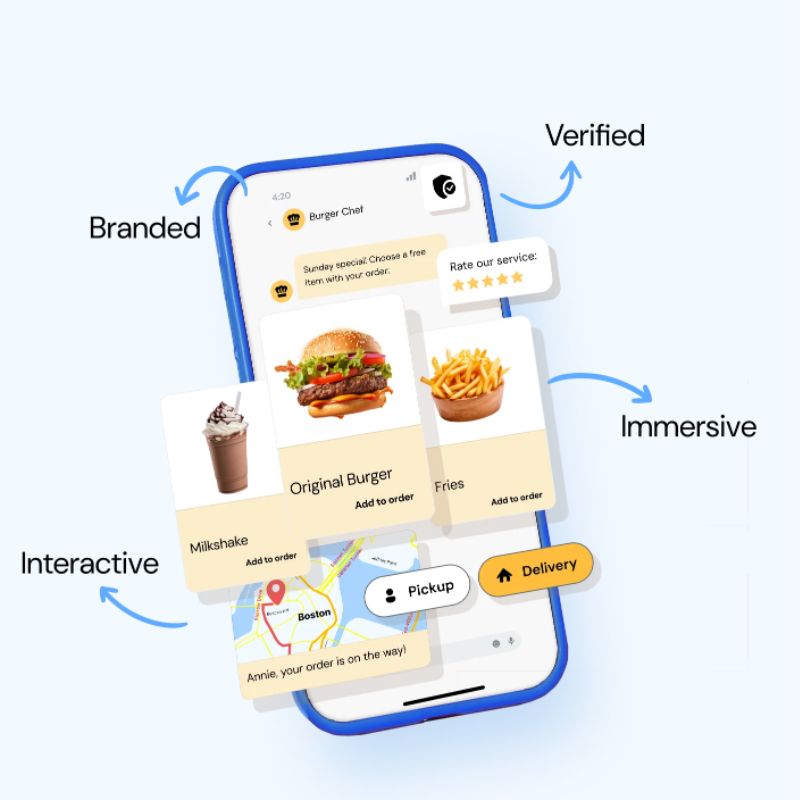
Send branded, verified, multimedia messages with cards, carousels, suggested actions, and more, straight to your customers’ native messaging inboxes.
Enable dynamic conversations.
Gain access to improved analytics like read rates to help refine your messaging strategy.
Reach your messaging goals, whatever they may be. From basic delivery updates that keep customers informed to immersive AI-driven conversational experiences that boost satisfaction.
RCS upgrades personal texting and redefines what’s possible in business messaging.
Is RCS the new SMS and MMS?
SMS has been the go-to for mobile messaging for decades, offering simplicity and universal reach, but how does it compare to RCS? RCS is a fully multimedia and secure communication channel offering incomparably better promotional options than SMS and MMS. Let’s break down the key differences between SMS and RCS.
SMS: Reliable, familiar, and everywhere
SMS is the OG of mobile messaging. It can reach nearly everyone with a mobile phone, no Wi-Fi required. It’s simple, reliable, and works great for basic interactions or as a fallback when other channels fail, but it has its limitations.
MMS works for sending images or videos in certain markets, but it can’t match the interactivity that RCS offers.
RCS: The next step in mobile messaging
RCS offers a better experience than SMS on both Android and compatible iOS devices, similar to apps like WhatsApp. RCS messages go straight to the native message inbox, so no app download is needed. Plus, RCS works over both Wi-Fi and cellular data networks (like 4G or 5G).
With features like real-time, branded messaging, rich media, suggested replies and actions, read receipts, and verified senders, RCS business messages create memorable experiences with higher engagement.
Building trust with RCS message
You’re wary of unknown texts — your customers feel the same. RCS adds extra credibility to your texts, ensuring they’re recognized and trusted instantly, every time.
Branded. Verified. Trusted.
Did you know that 87% of consumers actively avoid buying from brands they don’t trust, and 71% of customers will cut ties if that trust is broken? Establishing trust with your customers is essential for building a strong relationship – one where they remain engaged, informed, safe, and happy.
With RCS, every message is branded and verified and lands straight in your customer’s native mobile messaging app, ensuring a secure, reliable experience.
Let’s break down how it works.
Get recognized instantly
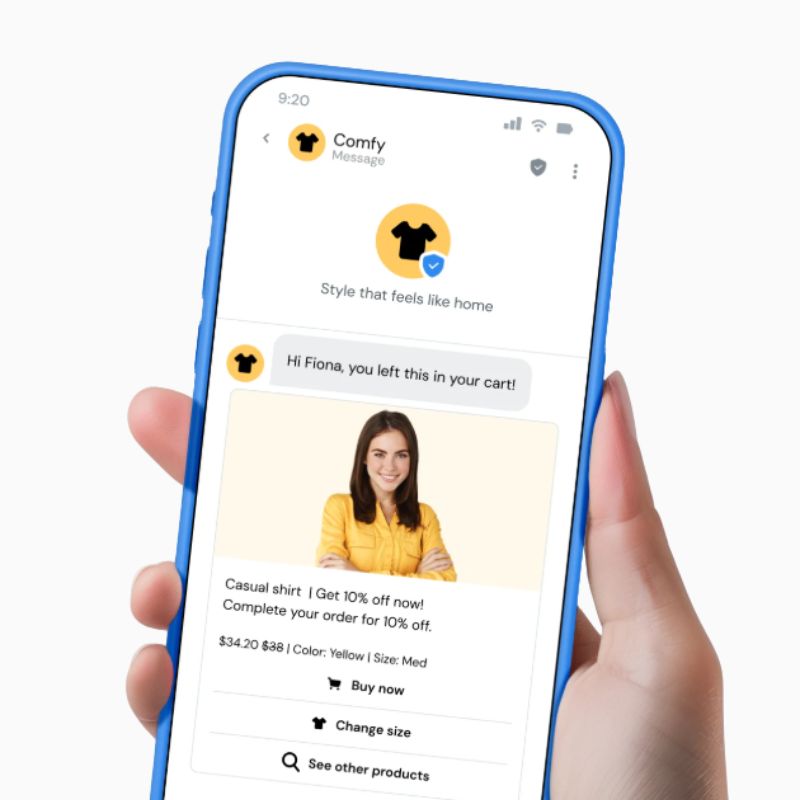
With RCS, your customers never have to wonder, “who’s this?” again – your verified sender profile displays your brand name and logo in every message. Instant recognition means total confidence in your messages.
Trustworthy interactions, every time
As a user, engaging with a verified sender profile gives you extra peace of mind for important updates like one-time passwords or fraud alerts. RCS helps build trust by making interactions feel more familiar and authentic.
Spam and unwanted messages? No, thank you. Only verified businesses get to send branded RCS messages, so your customers get messages they can trust from brands they know – no shady senders allowed.
Customers call the shots. They only get messages they’ve signed up for – so it’s totally on their terms. Plus, RCS supports encryption to keep those interactions secure and private. And for your business? You’re reaching an audience that actually wants to hear from you – while ensuring their data stays safe.
Text an experience and triple your click rates with RCS
Want to triple your click rates? RCS lets you craft rich, immersive experiences that captivate customers and spark real engagement. RCS lets you create rich, interactive conversations that engage your customers in new, exciting ways. Every text becomes an experience.
CX that just clicks
Regardless of your goal, RCS can help bring your messages to life. Businesses using RCS have seen200% increases in click rates compared to other channels – proof that engaging messages lead to a better customer experience.
*Source: Google, 2024
200% – increase in click rates vs. email
500% – Up to 500% higher engagement rates vs. SMS*
20% = click-through rates
Źródło: Sinch.com
What makes RCS marketing so powerful?
No downloads, just conversations
RCS works right in your customers’ native messaging apps – no downloads, no hassle. It’s smooth, seamless, and makes connecting with your customers as easy as possible.
More than just a text
Pixelation? Not with RCS. You can add high-resolution images, videos, maps, and more. When visuals boost click-through rates by 52%, why stick to plain text? Your customers will love the sharp details, and even better, they can interact with those messages in real-time.
Instant responses
Quick-reply buttons make it easy for your customers to respond with just a tap. And with AI integration, you can keep them engaged with instant, personalized conversations with minimal typing required.
Showcase your offers
Carousels in RCS mean you can present multiple items or offers in a single message. This means customers can swipe through your products and offers, all without ever leaving their messaging app.
Unparalleled engagement
You’ve heard that RCS is interactive, but what does that mean? It means your customers can act on your messages rather than just read them. From booking appointments to making purchases or signing up for events, businesses have seen RCS engagement rates soar by up to 500%*!
*Source: Google, 2024
Turn every interaction into real results
Instant recognition, faster conversations, actionable insights – see how RCS boosts business efficiency and results right where customers are.
RCS does more than get you noticed. It turns every interaction into an opportunity to maximize your messaging impact and build stronger connections – all backed by data.
Your texts could do more. A lot more.
Time is money, and you need tools that help you work smarter, not harder. That’s where RCS comes in and becomes the most effective way to reach customers right where they spend their time: their mobile inbox. No apps to download, no extra steps.
But how exactly do RCS statistics stack up when it comes to boosting business efficiency? We’ve got a few ways.
Actionable insights
Wondering who read your RCS message? You’ll know. Curious how long they stayed engaged? It’s about 45 seconds on average! Detailed analytics track everything from delivery to read rates, giving you the data you need to make better decisions and fine-tune your strategy.
Branded messaging means instant impact
Forget wasting time explaining who you are, because every RCS business message comes branded. This helps your customers instantly recognize it’s you, helping you cut through the noise and build trust faster.
Quick replies, fast conversations
Two-way conversations have never been easier. Quick-reply buttons let customers respond instantly, without having to type a thing. Want even faster customer service? Add AI capabilities to speed up resolutions and reduce abandoned messages.
More value out of every message
How do you keep retail customers engaged in a world of distractions where they’re bombarded with thousands of marketing communications every day? By going beyond basic messages and delivering rich, interactive experiences that capture attention and loyalty.
Some businesses see RCS click-through rates hitting 20% – leaps and bounds above other channels. And with customers spending almost a minute engaging with rich content, you’re making every second count.
Sinch RCS in a nutshell: Redefining digital customer communications
Check out our article:
Źródło: Sinch.com
6. FAQ: Your complete RCS resource hub
What is an RCS message?
RCS chat offers advanced communication capabilities like read receipts, typing indicators, high-quality media sharing, and more. RCS chats can also include multimedia like web pages, maps, and other images. These chats can take place directly in a user’s native mobile inbox.
RCS verified senders for businesses – what does it mean?
RCS verified senders are businesses that complete a process with either Google or a mobile carrier to authenticate their identity. This verification shows a brand’s logo, a checkmark, and company information in the message thread, which helps users trust the sender and distinguish them from spammers. The process carried out by Sinch involves providing business information and undergoing a validation to display verified sender profiles.
What information do I need to register RCS?
You will be asked to provide information about the purpose of your RCS messages. You will also need to outline the triggers and interactions that will prompt these messages. Additionally, information such as business contact, brand information, and assets will be necessary. And a sample message that you will send to your test number during the agent setup to demonstrate message functionality.
What information do I need to test RCS?
You need:
- A mobile phone number for testing your RCS agent. You will receive a test message on this number from Google. You will also use it to receive sample messages from your agent.
- A country where you want to provision and send RCS messages.
- An RCS use case for your agent (OTP, TRANSACTIONAL, PROMOTIONAL, MULTI-USE)
Testing your RCS agent is an important step before you go live with customers. By adding test numbers, you can preview how your brand looks and works within the registration flow, making sure everything functions as expected. Sinch developed a guide that walks you through how to add your number as a tester, confirm RCS compatibility, and manage multiple test numbers. Contact us to get the guide.
Do I need to install any applications to use RCS?
No, you do not need to install any extra applications to use RCS, as it is integrated into the native Messages app on most Android devices and supported natively in iOS 18. For users, RCS “chat features” are enabled within their existing messaging app, making it available without a separate download.
What if customers don’t have RCS
If customers don’t have RCS, they receive the message via SMS or MMS as a fallback, ensuring that the message is still delivered to the recipient’s native messaging app. This seamless fallback to a traditional text message is automatic and does not require a separate setup for the recipient, as long as a fallback sender ID is configured for the campaign.
How the fallback works? When you send a RCS campaign, our partner – Sinch first attempts to send the message through the Rich Communication Services protocol to recipients who have it enabled on their device. For any recipient who doesn’t have RCS enabled, the message automatically falls back to a standard SMS or MMS message. SMS/MMS is the backup. You do not need to know in advance which of your customers will receive the message via RCS or SMS. The system handles the delivery channel based on the recipient’s device capabilities.
Is RCS secure?
RCS offers a richer messaging experience than SMS – and this includes its more robust security measures. This includes measures like encryption in transit (i.e., the encryption of data as it moves between a user’s device and services) and end-to-end encryption in some cases. This ensures that messages remain secure as they travel over networks.
This verification process helps prevent spam and phishing attacks which are common in traditional SMS.
Is RCS encrypted? Does RCS have end-to-end encryption?
RCS supports end-to-end encryption (E2EE) for person-to-person (P2P) messaging under specific conditions. For this to work, both users must be on RCS-compatible devices, like two Androids using Google Messages. RCS chats that are end-to-end encrypted have a few visual indications.
What is “encrypted in transit” in RCS?
The data flow and architecture for RCS follows a multi-step path.
- A verified brand creates and sends an RCS message.
- The message is encrypted between the sender’s agent and the RCS for Business platform, either directly or via an aggregator.
- When the message reaches Google’s RCS for Business platform, the message is scanned for compliance with terms of service (e.g., for malware and spam).
- All messages are encrypted in transit between the RCS for Business platform to end users.
How does a user opt in to receive RCS messages? How do they opt out?
A user can opt in to receive RCS messages in the same way they might opt in to receive other business messages, like SMS. They can give their consent through checking a consent box on a form, for example. The same thing applies for opting out of receiving RCS messages. If a user replies “STOP,” or requests to take their name off a database, a business needs to stop contacting them. Businesses must support these opt-out requests, and Google requires businesses to provide confirmation that opt-in consent has been obtained and that opt-out options are available.
How does RCS help with spam?
RCS has built-in mechanisms to combat spam, primarily through its verification process for businesses. Only verified businesses can send branded RCS messages, which helps make sure that users aren’t sent fraudulent messages. Businesses can’t send messages unless they’ve first been verified, this cuts down on spam and builds trust with the user. Additionally, Google has prioritized spam detection in RCS to maintain it as a trusted channel.
How does look the process for a business getting verified to send RCS? Who is involved in the process?
It varies by region, but this process involves multiple parties like carriers, third-party verification services, and Google itself. In any case, businesses must apply to be verified when they launch their RCS Agent. They need to submit identification and business information, and then their application is reviewed to ensure they meet the criteria to send RCS messages. Verifying a business involves confirming they’re a legitimate business and that they’ll adhere to industry regulations. The time it takes to process a business’ verification request can vary. It often takes a few days but, in some cases, can take longer.
Is RCS GDPR compliant?
Google expectation is that all brands and aggregators comply with local laws and adhere to data security regulations like GDPR and supply a privacy policy that clarifies how they use and/or share end user data. Google says it complies with GDPR.
What types of messages can I send via RCS?
With RCS, you can send a variety of rich messages, including high-resolution photos and videos, long-form text messages, maps and directions, files like PDFs and GIFs, and links. RCS also supports advanced features like suggested replies and action buttons, read receipts and typing indicators, which are not available with standard SMS/MMS.
Dowiedz się, jak klienci korzystają z naszych produktów i usług. Zapraszamy do kontaktu!

Produkty
SAP Customer Experience
SAP Field Service Management
SAP Conversational AI
SAP Intelligent Robotic Process Automation
Sinch Contact Pro
Infrastruktura VoIP
1trust Service
Usługi
Wdrożenia
Zarządzanie projektami
Integracje i pomoc techniczna
O nas
O firmie
Partnerzy i technologie
Aktualności
Polityka prywatności