
Chat: What is it and how do you turn it on or off?
RCS chat (Rich Communication Services) is the next generation of mobile messaging, designed to replace traditional SMS and MMS with a faster, richer, and more interactive communication experience. Whether you’ve received your first RCS message, want to know how RCS works, or are looking for instructions on how to enable or disable RCS on your phone, this guide covers everything you need to know. Learn how RCS differs from SMS, what features it offers, how much it costs, whether it is safe, and whether it is worth completely disabling RCS on your phone.
Key Facts at a Glance
- RCS is a richer alternative to traditional SMS and MMS. It enables high-quality photo and file sharing, message reactions, group chats, location sharing, and direct communication with businesses. Like WhatsApp or Messenger, it offers an interactive messaging experience while being integrated into your phone’s default messaging app.
- How do you enable RCS? RCS often activates automatically when you open the Messages app. If it doesn’t, you can easily enable it in your phone’s messaging settings.
- How do you disable RCS? You can either disable RCS completely or block RCS messages from a specific brand. When RCS is turned off, your phone switches back to SMS/MMS. Messaging continues as usual, but without the enhanced multimedia and interactive features.
- How can you use RCS for marketing? You can also opt out of RCS communications from a specific brand while continuing to use RCS with other senders.
- Is it worth disabling RCS? RCS is an important evolution in mobile messaging. Its interactive features can make communications more engaging and effective, making it worth taking advantage of its capabilities.
RCS Chat – What does it mean?
RCS stands for Rich Communication Services. In simple terms, it is a modern, enhanced version of the familiar SMS and MMS messaging experience, available primarily on smartphones. However, RCS and SMS are not the same, nor is RCS the same as MMS. The differences are significant. Sending SMS, you can only send plain text. With MMS, you can send images or videos, but they are typically compressed and of relatively low quality. RCS takes messaging to the next level by allowing you to send high-quality text, images, and videos while creating a more interactive and engaging communication experience. Photos and videos shared through RCS chat are significantly higher in quality because the technology does not impose the same limitations or strict file size restrictions as MMS. You can also send messages even without cellular coverage – all you need is a Wi-Fi connection. If you receive an RCS message from your favorite brand, you may be able to browse an interactive product carousel, select and purchase products, chat directly with a customer service representative, and much more – all within the conversation.
RCS Message – What is it and how does it work?
RCS (Rich Communication Services) is an advanced messaging standard that provides end-to-end encryption for person-to-person conversations, meaning only the sender and recipient can read the messages. It replaces traditional SMS and MMS messaging by offering many of the features users already know from popular instant messaging apps. As a richer and more engaging alternative to conventional text messaging, RCS supports images, videos, message reactions, group conversations, location sharing, and – most importantly for businesses – interactive communication with the company sending the message. Even better, you don’t need to install a separate application to use RCS, as it works directly within your phone’s native messaging app.
The key difference between traditional SMS messaging and RCS chat is that RCS supports rich multimedia content – including photos, videos, and audio recordings – while also enabling group conversations. As a result, it offers functionality similar to popular messaging platforms, but without requiring users to leave their default messaging application.
RCS for business is one of the business channels in customer communication and it is often integrated with contact center and a chatbot, allowing you to obtain additional information or speak with an agent.
RCS chat delivers a modern messaging experience that works in a similar way to apps such as WhatsApp or Messenger. It uses information such as your phone number, SIM card details, and device ID to establish communication. Instead of relying exclusively on the cellular network, RCS uses Internet Protocol (IP), allowing messages to be sent over both Wi-Fi and mobile data. The system creates a communication session between the sender and recipient and maintains that connection throughout the conversation. This is what enables features such as typing indicators, showing when someone is replying, and message delivery and read receipts. In short, RCS combines the simplicity and reliability of traditional SMS with the advanced features of today’s most popular messaging apps, making communication richer, more interactive, and easier than ever.
RCS Message – What does it mean on Your phone?
Many people encounter an “RCS Message Received” notification on their smartphone for the first time and aren’t entirely sure what it means. This notification indicates that the device is using RCS chat to send and receive messages. Instead of being transmitted through the traditional mobile network, the message is delivered over the internet using the IP protocol and an active internet connection, either through Wi-Fi or mobile data.
Some messaging apps automatically decide when to use RCS and when to switch to SMS. This usually depends on the availability of an internet connection and whether the recipient’s device supports RCS. If one of the participants in the conversation does not support RCS, the message is automatically sent as an SMS or MMS instead. The user doesn’t need to do anything, as this process happens seamlessly in the background without any manual intervention.
How to enable RCS chat on Your phone
In many cases, RCS chat is activated automatically the first time you open the messaging app, without requiring a separate installation. From the user’s perspective, the main benefits are a smoother, more interactive, and higher-quality messaging experience. Importantly, automatic activation primarily applies to the default messaging app, such as Google Messages on Android devices, where RCS is a built-in feature. However, manual activation may be required for other messaging apps or older versions of the Android operating system.
If RCS chat is available on your device but hasn’t been enabled automatically, it’s worth turning it on. The activation process is simple and only takes a few moments, provided your smartphone supports RCS and you have an active internet connection. Most phones come with the Google Messages app pre-installed, which supports RCS. If RCS wasn’t activated automatically when you first opened the app, you can enable it manually by following these steps:
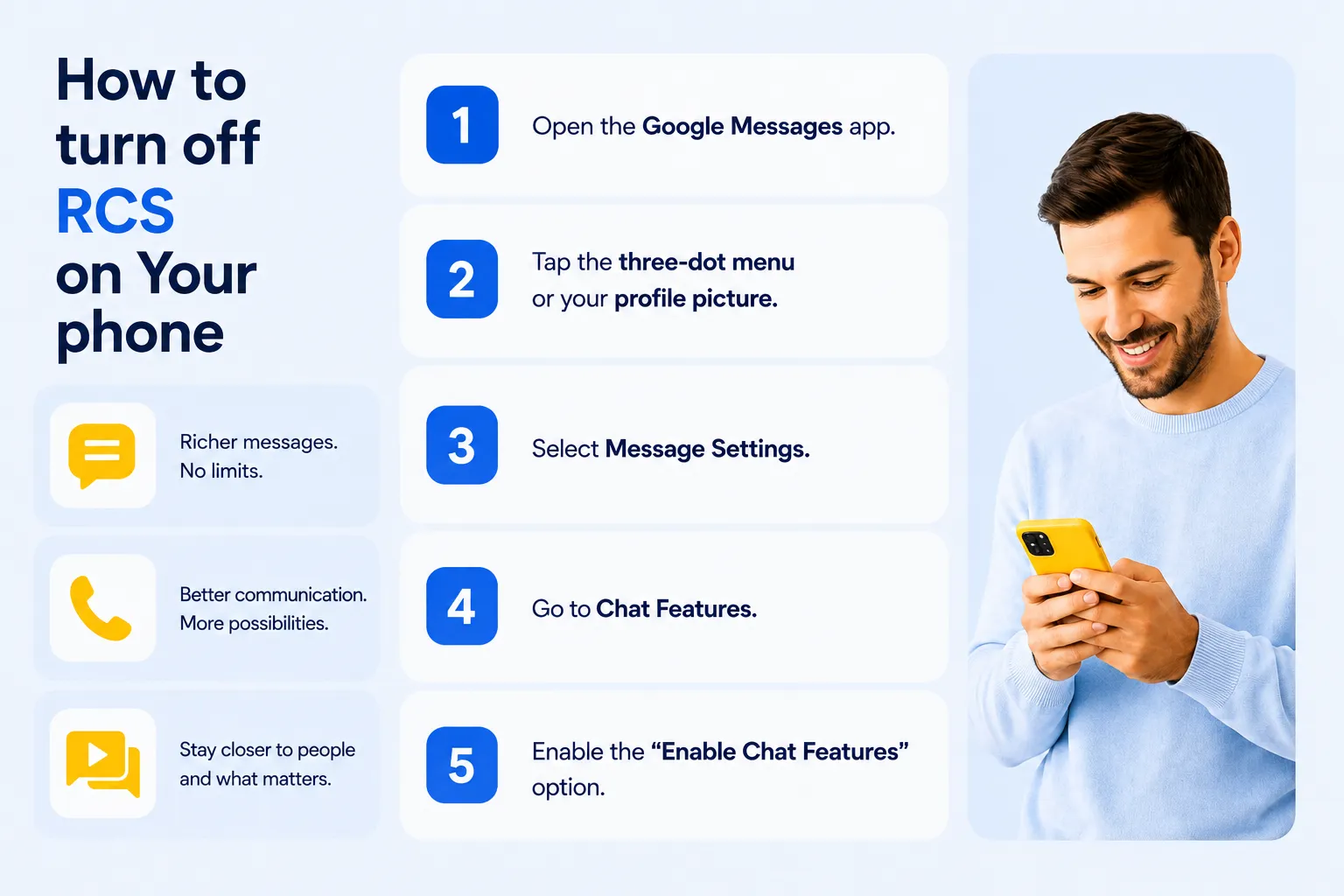
Once the activation is complete, you’ll see the status “Connected”, confirming that RCS is active. You can then enjoy features such as high-quality photo and video sharing, read receipts, typing indicators, and group chats – all without installing any additional apps. Keep in mind that the exact activation process may vary slightly depending on your Android version and smartphone manufacturer.
How Do I turn off RCS Chat on my phone?
Although RCS offers many advanced communication features, many users are primarily concerned about cost and security.
If you receive an RCS message from a brand, you don’t pay anything. RCS messaging is free to use. If you’re connected to Wi-Fi, there is no mobile data usage. When using mobile data, RCS consumes only a very small amount of data – typically less than loading the homepage of a news website. In practice, this means minimal and almost negligible data consumption. While traditional SMS may use less data overall, it offers significantly fewer communication features and a much less engaging user experience.
When comparing SMS and RCS, security is another important RCS advantage. Every RCS message sent by a business is branded and verified before being delivered directly to the recipient’s native messaging app, providing a secure and trustworthy communication channel. Before a company can send RCS messages, it must complete a verification and authorization process.
Unlike traditional SMS, where the sender may appear as an unfamiliar phone number or an unverified name, RCS displays the verified brand name and official logo with every message. This makes it immediately clear who the sender is and significantly reduces the risk of phishing or fraudulent messages. In addition, the messages themselves are encrypted, and business communication is delivered only after the user has given the appropriate consent.
RCS is designed to work seamlessly across compatible devices. However, if your mobile operator does not support RCS, you won’t be able to use the service, even if your smartphone is fully compatible. For this reason, brands running RCS campaigns typically configure them with SMS fallback. This means that if a recipient cannot receive RCS messages, the same communication is automatically delivered as a traditional SMS instead. As a result, two customers participating in the same campaign but using different mobile networks may receive the same message in different formats – one as an interactive RCS message and the other as a standard SMS.
How do I turn off RCS chat on my phone?
If you don’t like RCS – for example, if you find it too complicated or inconvenient – you can easily disable it. Turning off RCS chat automatically switches your phone back to traditional SMS and MMS messaging. You won’t lose the ability to send or receive messages, but you will no longer have access to RCS features such as high-quality media sharing, read receipts, typing indicators, and other advanced messaging capabilities.
You can either disable RCS completely on your phone or stop receiving RCS messages from a specific brand while continuing to use RCS with everyone else.
RCS Messages – how to turn off RCS on my phone and switch to SMS
If you no longer want to send or receive RCS messages, follow these steps to disable RCS on your phone. Please note that the exact procedure may vary slightly depending on your Android version and smartphone brand.
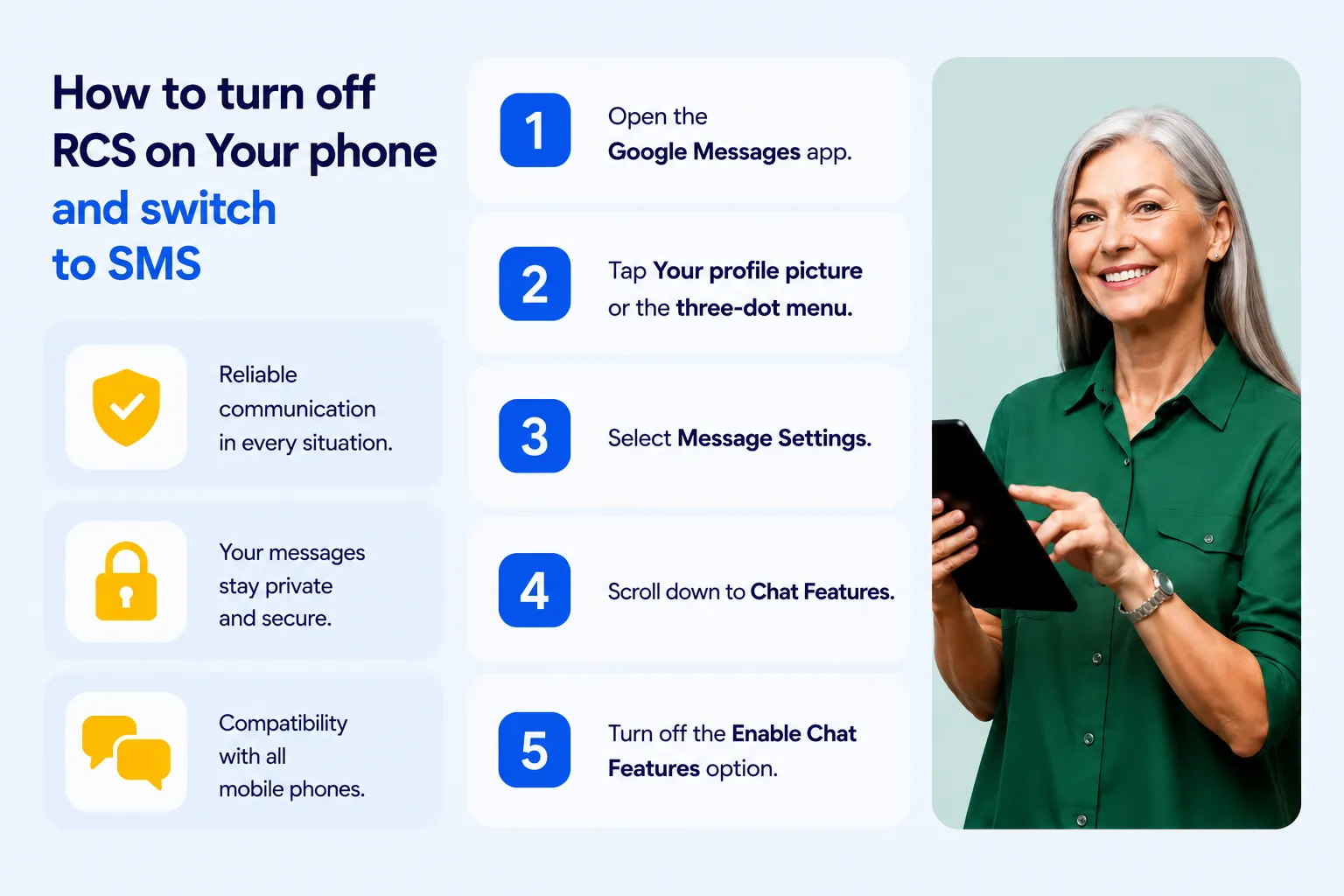
If you don’t see the RCS option in your settings, make sure your mobile operator supports RCS messaging. If you experience any issues while disabling RCS, restarting your phone may help apply the changes.
How can you check whether RCS has been successfully disabled? Simply return to the Chat or Chat Features settings (depending on your device) and confirm that RCS is turned off. You can also ask someone who uses RCS to send you a message. If you no longer see features such as typing indicators or read receipts, RCS has been successfully disabled. If you change your phone or phone number, it’s also recommended that you deregister RCS on your old device. Google provides a dedicated online form for this purpose.
RCS Messages – how to disable RCS for brand communications
If you’ve received an RCS message from a brand, it means you previously gave your consent to receive marketing or business communications, which may include RCS messaging. You can withdraw this consent at any time. This option only disables RCS communication with a specific business sender while allowing you to continue using RCS with everyone else. Before taking this step, make sure you understand what you’re disabling. Depending on how the brand manages customer communications, withdrawing your consent may also stop you from receiving important SMS messages from that business.
Why is it worth considering disabling RCS for a single sender instead of turning off RCS completely? RCS represents the future of mobile communication, and many industry experts expect it to become the standard messaging technology in the coming years. Disabling RCS entirely could mean missing out on richer, more interactive communications from trusted brands and services.
RCS – The Future of Communication
RCS has the potential to become the new standard for modern mobile communication. It enables rich multimedia messaging, interactive conversations, group chats, and seamless communication without requiring users to install third-party messaging apps.
Thanks to its modern design and advanced capabilities, RCS is significantly more effective than traditional SMS for business communication. Whether a company is sending promotional offers, customer service updates, appointment reminders, or transactional notifications, RCS makes every message more engaging, interactive, and effective. As more mobile operators, smartphone manufacturers, and businesses adopt the technology, users can expect to receive an increasing number of RCS messages in the future.
FAQ
What is RCS chat?
RCS (Rich Communication Services) is the next generation of SMS messaging. It allows users to send high-quality photos and videos, create group chats, share locations, see typing indicators and read receipts, and interact with businesses through rich, interactive messages – all within the phone’s native messaging app.
Is RCS the same as SMS?
No. SMS only supports plain text messages, while RCS offers a much richer messaging experience with multimedia content, read receipts, typing indicators, and interactive features. If RCS isn’t available, messages are typically sent as SMS or MMS instead.
Do I need to install an app to use RCS?
Usually not. Most Android smartphones support RCS through the Google Messages app, which is often pre-installed. If your device and mobile operator support RCS, you can enable it directly in the app’s settings.
Does RCS work without a mobile signal?
Yes, as long as you have an internet connection. RCS messages are sent over Wi-Fi or mobile data using the Internet Protocol (IP), so you don’t need a traditional cellular signal to communicate.
Is RCS free?
Yes. Sending and receiving RCS messages is free. If you’re connected to Wi-Fi, there are no mobile data charges. When using mobile data, RCS consumes only a small amount of data, similar to other messaging apps.
Is RCS secure?
RCS offers a richer messaging experience than SMS – and this includes its more robust security measures. This includes measures like encryption in transit (i.e., the encryption of data as it moves between a user’s device and services) and end-to-end encryption in some cases. This ensures that messages remain secure as they travel over networks. This verification process helps prevent spam and phishing attacks which are common in traditional SMS.
Why am I receiving RCS messages instead of SMS?
Your phone automatically uses RCS when both you and the recipient have compatible devices, supported mobile operators, and an active internet connection. If any of these requirements aren’t met, the message is usually sent as a traditional SMS or MMS.
Can I turn off RCS?
Yes. You can disable RCS at any time in your messaging app’s settings. Once disabled, your phone will automatically send and receive messages using SMS and MMS instead.
Can I disable RCS for one brand only?
Yes. If you no longer want to receive RCS messages from a particular business, you can withdraw your consent for that brand’s communications while continuing to use RCS with other contacts.
Does every phone support RCS?
Not all phones support RCS. Most modern Android smartphones are compatible, but support also depends on your mobile operator and messaging app.
What happens if the recipient doesn't support RCS?
If the recipient’s device, messaging app, or mobile operator doesn’t support RCS, the message is automatically sent as an SMS whenever possible. This happens in the background without requiring any action from the user.
Autor:
Joanna Pytlakowska
VP Sales & Marketing, Comtrust


Dowiedz się, jak klienci korzystają z naszych produktów i usług. Zapraszamy do kontaktu!


Produkty
SAP Customer Experience
SAP Field Service Management
SAP Conversational AI
SAP Intelligent Robotic Process Automation
Sinch Contact Pro
Infrastruktura VoIP
1trust Service
Usługi
Wdrożenia
Zarządzanie projektami
Integracje i pomoc techniczna
O nas
O firmie
Partnerzy i technologie
Aktualności