
Helpdesk System – what is it and how businesses use it?
How does a Ticketing System Support Request Handling?
Each service request has specific features and elements and objects and their relationships form the structure of the data allowing for efficient tracking, managing, and resolving of customer service issues.
Key ticket elements:
Ticket number – Every ticket has its unique number which is always automatically assigned to the ticket and additional information that allows for more efficient processing and management of tickets.
The document type (service request or incident report),
Service Object – specifies the service, product, or system related to the ticket. It helps in categorizing and routing the ticket to the appropriate support team.
Involved parties engaged in the ticket process (the customer who raised the ticket, the service agent handling the ticket, or any other individuals or groups involved in resolving the ticket like managers, the IT team, third-party service providers and partners)
Priority and reaction time – The reaction time is the time it takes for the support team to acknowledge and respond to the ticket after it has been created. It is often measured as part of service level agreements (SLAs).
The status refers to the different stages that a ticket goes through in its life cycle (open, in progress, closed). The status of a ticket helps in understanding its current position in the resolution process and aids in tracking and managing the ticket effectively.
The “customer detail” object may contain attributes like name, contact information, and previous interaction history.
Interactions – show records of communication and actions taken by both the customer and the support team. This includes updates, comments, and any additional information related to the ticket. They could be an e-mail linked to the ticket or a phone call.
Document Flow represents the life cycle of the ticket from creation to resolution or closure. It includes the transitions between different statuses and the actions taken at each stage.
Ticket Service Process involves several stages, including:
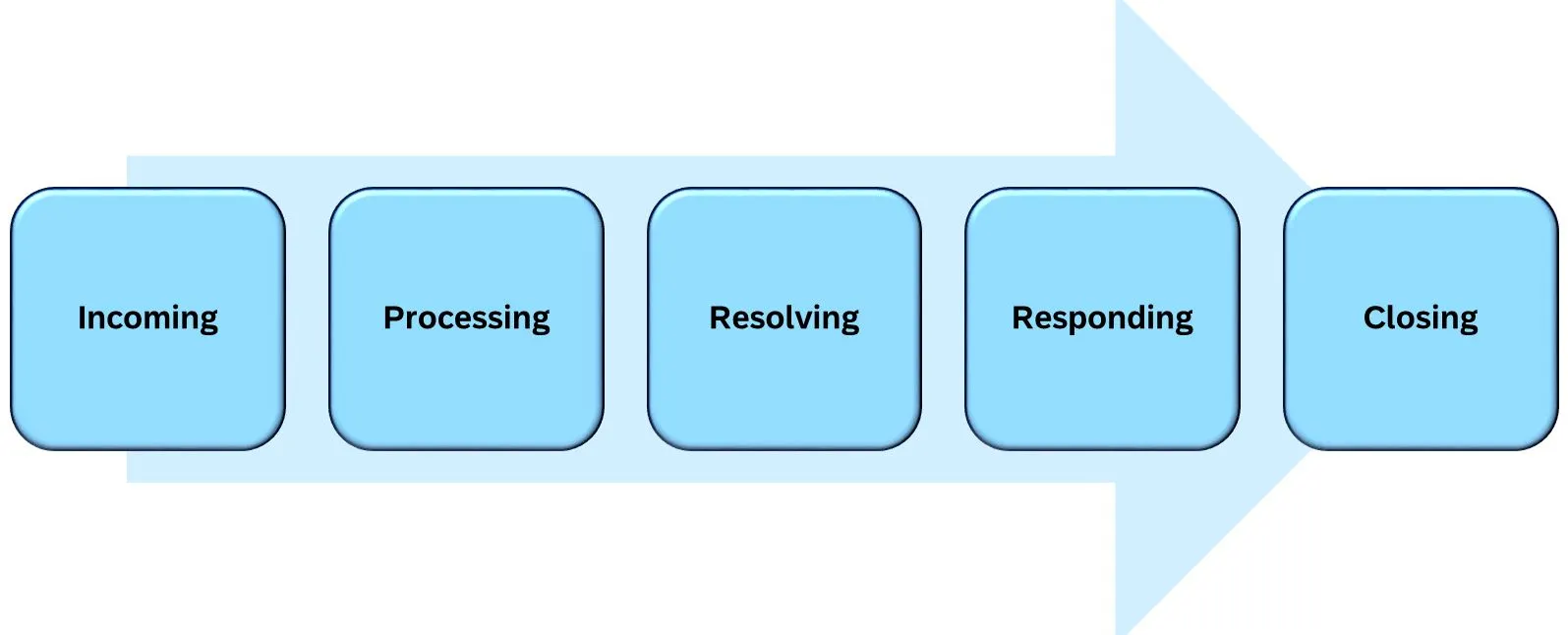
* źródło SAP
How does a Ticketing System work?
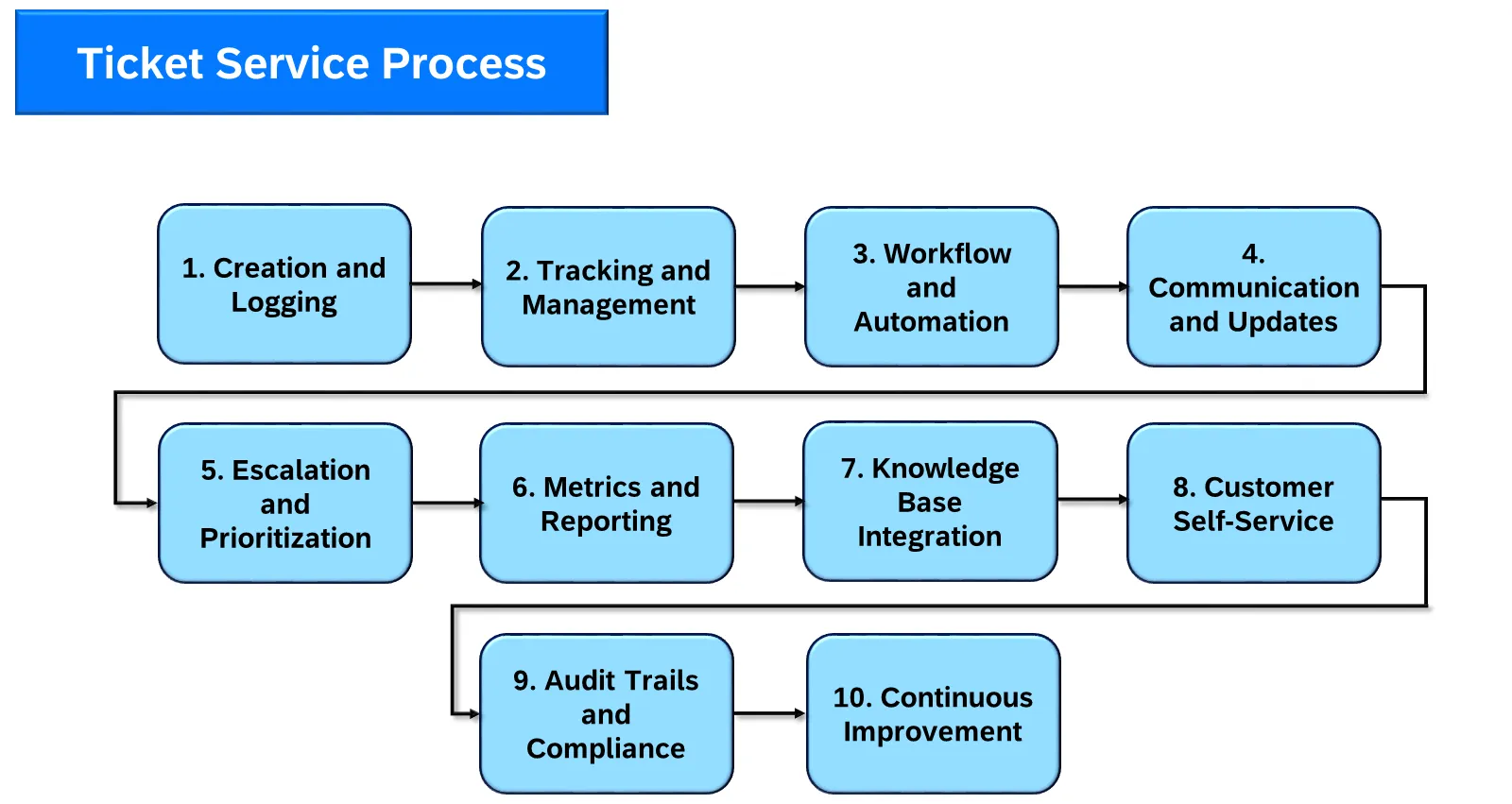
* źródło SAP
Creation and Logging:
- Tickets are typically created when a customer or user submits a request or reports an issue.
- Information such as the nature of the request, contact details, and any relevant details are logged into the ticket.
Tracking and Management:
- Tickets serve as a centralized way to track and manage service requests. They help ensure that requests are not overlooked and are handled in a timely and orderly manner.
- Service teams often use ticketing systems to assign, prioritize, and categorize tickets for efficient handling.
Workflow and Automation:
- Tickets often follow predefined workflows. For example, a ticket may move from an initial status of Open to Assigned, In Progress, Pending, and finally Closed when the issue is resolved.
- Automation tools are frequently used to streamline ticket workflows, automating routine tasks and notifications.
Communication and Updates:
- Tickets facilitate communication between service teams and customers.
- Updates on the status of a ticket, resolutions, or additional information can be added to the ticket, providing a transparent and traceable communication trail.
Escalation and Prioritization:
- Depending on the nature of the issue or request, tickets can be escalated to higher levels of support or management for resolution.
- Prioritization is crucial to ensure that critical issues are addressed promptly.
Metrics and Reporting:
- Ticketing systems generate valuable metrics and reports that help organizations analyze the performance of their service teams.
- Metrics may include response time, resolution time, ticket volume, customer satisfaction, and more.
Knowledge Base Integration:
- Some ticketing systems integrate with knowledge bases, allowing support agents to access relevant information to resolve issues more efficiently.
- This integration helps in maintaining a consistent and accurate knowledge repository.
- It may include FAQs, troubleshooting guides, and best practices to aid in ticket resolution.
Customer Self-Service:
- Some ticketing systems allow customers to create and track their own tickets through self-service portals, reducing the workload on support teams.
Audit Trails and Compliance:
- Tickets provide a historical record of all actions taken during the life cycle of an issue or service request, which is important for auditing purposes and compliance with industry regulations.
Continuous Improvement:
- Analysis of ticket data can inform continuous improvement efforts. Identifying recurring issues can lead to process improvements, additional training for support teams, or updates to self-service resources.
How an Case Hierarchy Improves Helpdesk and Ticket Management?
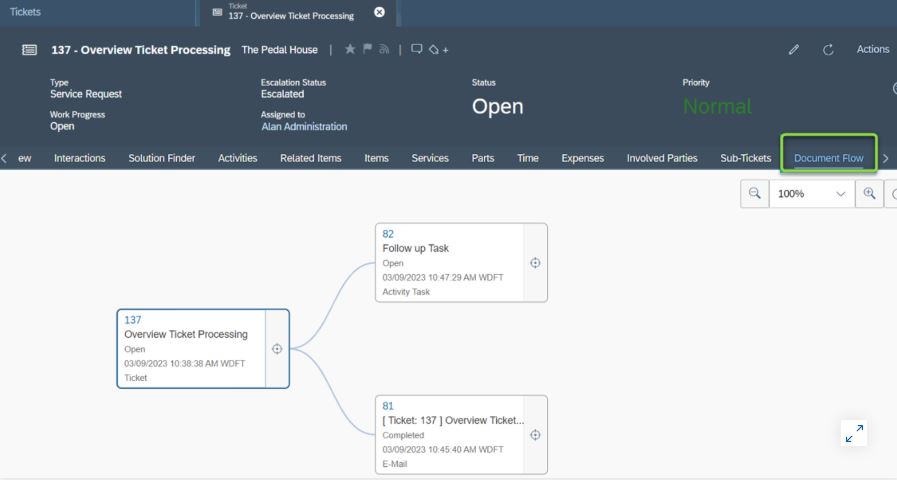
* źródło SAP
Ticket Management in SAP systems
Customer Interaction Management in SAP S/4 Hana
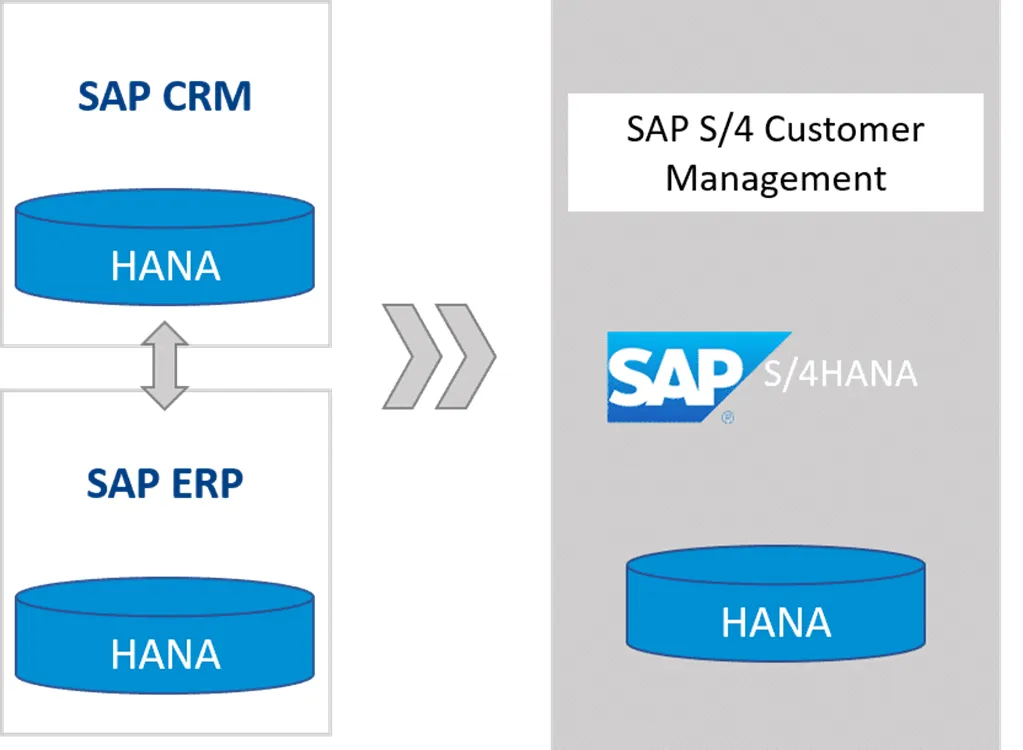
S/4HANA for Customer Management has adopted functionalities of Service Management from SAP CRM. The service area supports the whole range of service processing, from service request, ticket and complaint management, to quotations, service orders, reports, and service orders for mapping framework agreements with customers. In SAP ecosystem, the functions from sales and service are integrated completely into logistical and financial follow-up processes.
Customer Management offers an interaction center for service employees to communicate with customers inbound and outbound via telephone, mail, chat or other communication channels.
Interaction Center includes:
- automatic account identification
- interaction records
- agent inbox for different kinds of documents and contacts (including e-mails)
- knowledge management
- agent guidance
- out of the box integration with SAP Contact Center (Sinch)
SAP offers as standard, two roles of Helpdesk and Services:
- Service Employee Role
to support service technicians who need to manage customers, products, service requests, service order quotations and service confirmations
- Service Professional Role
prepared for service managers or supervisors who have access to objects with possibility also to create templates and cleansing cases.
The strengths of Helpdesk in SAP S/4 Hana Customer Management
Unified data and processes
Helpdesk integration with logistics, finance and HR
Customer Management part of S/4HANA is fully integrated across ERP modules, like logistics, finances and human resources, for example after releasing Service Order, items that are assigned to this document are pushed to logistics and controlling.
With the installation of Customer Management on SAP S/4 HANA, all information and processes that are relevant in customer relationship management become part of the HANA database schema and the duplicate data storage that once existed between ERP and CRM becomes superfluous.
Contact Center Integration
SAP S/4 Hana provides native integration interfaces to Sinch Contact Center system, creating a homogeneous environment for business and communication data. For those responsible for the system, this represents a huge added value – the infrastructure is many times simpler, as the interface between the systems will no longer be necessary.
Free of charge
S/4HANA customers also select Customer Management because there are no additional costs. That is, for the S/4HANA implementation, there are already CRM functionalities available without additional licenses.
SAP Service Cloud part of the SAP Customer Experience (CX) portfolio
With this service solution, you can:
- Increase productivity with AI-driven insights, recommendations, and automation
- Deploy AI agents to supercharge service efficiency
- Improve accuracy and speed up issue resolution with powerful case management
- Adjust service operations to meet customer expectations
How Artificial Intelligence Supports Case Management and Helpdesk
- Increase efficiency, savings, and customer satisfaction by using AI to generate insights and recommendations and to automate service tasks, reducing manual work.
- Simplify agent experience with a user-friendly agent workspace, intuitive case management, and AI-driven insights and recommendations.
Businesses around the world* have achieved great business benefits with the solutions, including:
40% Faster to resolve service tickets
41% Reduction in cost to serve
25% Increased customer satisfaction score (CSAT
Source: Internal SAP metrics
Get to the right resolution faster
Use AI to quickly resolve routine issues and guide service teams to the next best step, reducing customer effort.
Personalize support at scale
Deliver impactful, personalized support using AI insights grounded in unified enterprise data.
Turn customer service into a growth opportunity
Boost measurable business impact by increasing retention, reducing escalations, unlocking upsell opportunities, and lowering service costs.
Customer service agility
By staying agile in changing situations, you can quickly adjust your customer service when needed.
Unified enterprise
Boost collaboration and efficiency by breaking down system silos—connecting customer service with the rest of the organization.
Omnichannel service
With native integration with Sinch Contact Center, organizations Increase customer satisfaction and loyalty by providing fast, reliable, and personalized service across all communication channels.
Intuitive case management
Resolve issues faster with intuitive case management in SAP Service Cloud that guides your agents through the resolution process. Easily adapt your service workflows with a dynamic case designer.
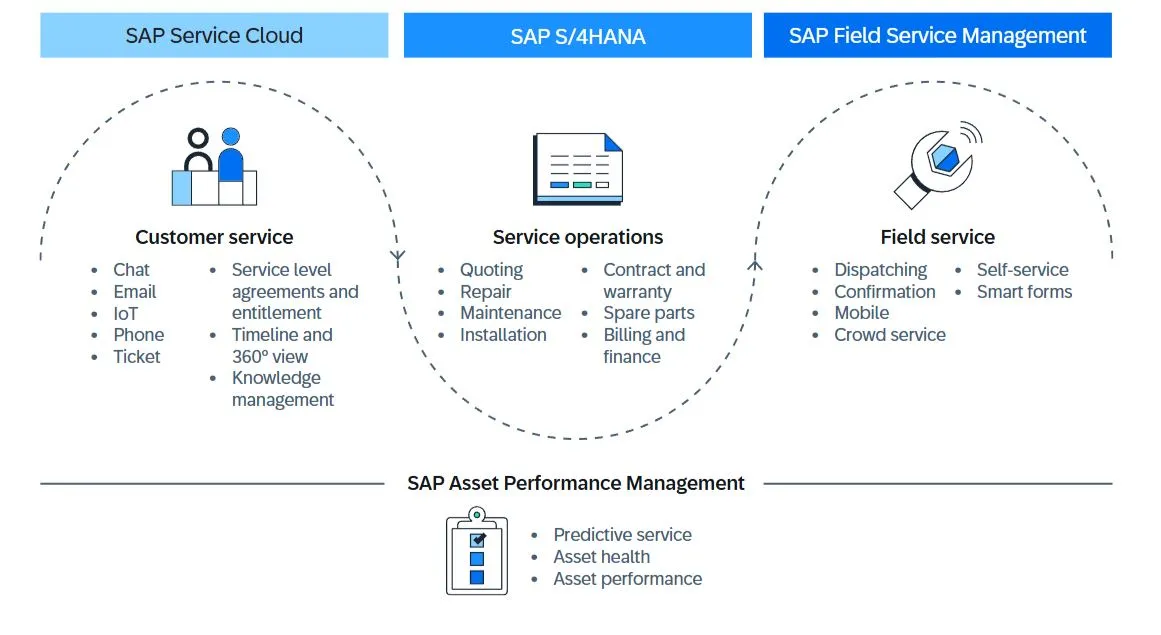
How to connect helpdesk agents with field service technicians?
Find out how customers use our products, services and SAP technology. Welcome to contact!


Products
SAP Customer Experience
SAP Field Service Management
SAP Conversational AI
SAP Intelligent Robotic Process Automation
Sinch Contact Pro
VoIP Infrastructure
1trust Service
Services
Implementations
Project management
Integration and Support
About us
Company and team
Partners and technologies
News