
WhatsApp Business API
Scale customer conversations, automate repetitive work, and create new opportunities for revenue and efficiency – make WhatsApp work harder for your business.
Turn WhatsApp into a scalable revenue & efficiency channel
Connect with customers, automate conversations, and integrate WhatsApp with your business systems to drive sales, improve service, and reduce operational workload.
Turn WhatsApp into a scalable customer engagement channel
Transform WhatsApp into a powerful channel for marketing, sales, customer service, notifications, and automation – fully integrated with your existing business systems.
Turn WhatsApp into a scalable sales & service channel
Engage customers where they already are, automate key interactions, answer questions, inspire purchases, and sell more.
Turn WhatsApp into a scalable business communication platform
Combine WhatsApp messaging, automation, chatbots, and CRM and Contact Center integrations to create faster, smarter, and more efficient customer journeys.
WhatsApp chatbots allow businesses to automate the most common customer queries and hand them over to a human agent when needed. The results: 24/7 support, quick response times, improved team efficiency, greater satisfaction, and higher conversions.

WhatsApp Business API – New Opportunities for Customer Communication
Ways to use WhatsApp
Get in front of your customers where they’re already chatting. Use personalized WhatsApp messages for more impactful:
- Marketing campaigns and promotions
- New product announcements and deals
- Feedback surveys
- Alerts and notifications from CRM and ERP systems
- Appointment reminders and Booking confirmations
- Live chat and customer support by AI agents
- Human-agent handover
Drive audience engagement through interactive touchpoints
WhatsApp supports rich content like images, videos, and buttons to elevate your customer conversations. You can manage it all using:
- Rich cards
- Buttons and quick replies
- Direct links
- Native integrations
Improve key business results
- Initiate conversations with customers and make it easy for them to reach out to you. Don’t wait for customers to learn about your brand and reach out to them proactively.
- Show your customers that interacting with you is safe by using a verified account. Your verified business account builds trust.
- Deliver engaging experiences through rich interactions such as text, image, videos, emojis, URLs, cards, quick replies, and selection lists.
- Stay available 24/7 with AI agents and chatbots.
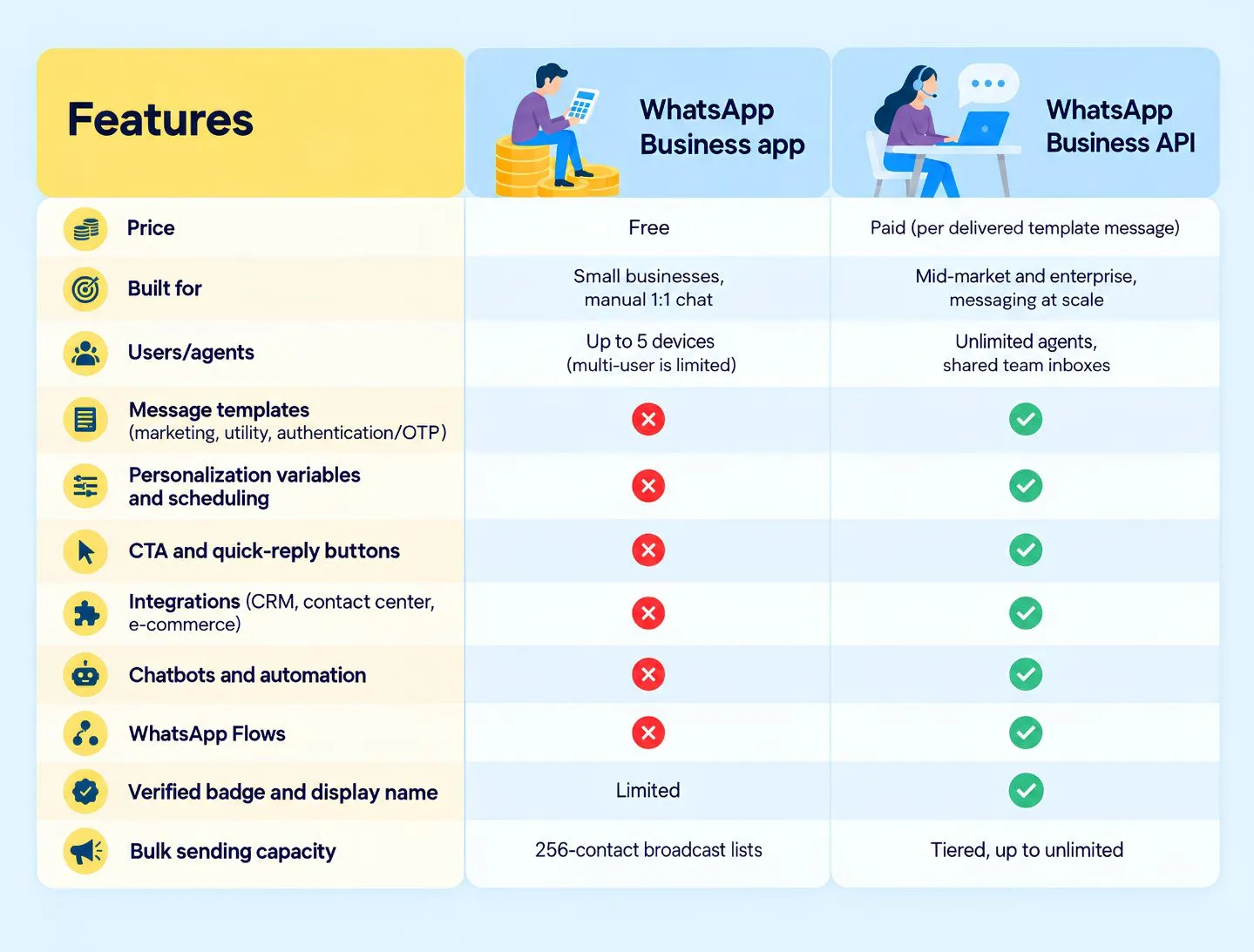
WhatsApp Business app vs. WhatsApp Business API
WhatsApp Business is Meta’s family of products for company-to-customer messaging on WhatsApp. It comes in two flavors:
- The WhatsApp Business app – a free smartphone app for small businesses: business profile, catalog, quick replies, and manual chatting.
- The WhatsApp Business Platform (API) – a paid, programmatic product for businesses that message at scale: templates, chatbots, team inboxes, and CRM integrations, accessed through a provider rather than an app.
WhatsApp Business app vs. WhatsApp Business API – the two business options serve very different scales.
WhatsApp Business vs. personal WhatsApp
You can run a business on personal WhatsApp, it isn’t a business tool. If your business grows past one person and a phone, WhatsApp Business – available as an app or a platform, is the right choice.
How Does WhatsApp Business API Implementation Work?
Needs Analysis and Solution Design
We analyze your business operations, existing communication channels, and organizational needs. We identify processes that can be improved or automated and design a solution tailored to your business objectives, technological infrastructure, and expected customer service volume.
Configuration, Integration and Automation
We configure the WhatsApp Business API environment and integrate it with CRM, Contact Center, and other business systems. We implement tailored communication workflows, automated notifications, chatbots, and AI-powered solutions to create a seamless customer service ecosystem.
Testing, Launch and Optimization
We verify the functionality of integrations, automation processes, and individual communication workflows. We prepare the solution for production launch and support its implementation across your organization. Ongoing system performance analysis enables continuous process optimization and the development of new features as your business needs evolve.
We bring technology, automation, and communication together into one seamless ecosystem that streamlines customer service and drives business growth.
FAQ
What’s the difference between WhatsApp and WhatsApp Business?
WhatsApp is for personal messaging. WhatsApp Business adds company tools – a business profile, catalog, and basic automation in the free app, or full-scale templates, integrations, and team inboxes on the paid platform. Using personal WhatsApp commercially is against WhatsApp’s terms.
What’s the difference between the WhatsApp Business app and the API?
The app is a standalone phone app you operate manually. The API (Business Platform) has no interface of its own – it connects WhatsApp into your CRM, help desk, and marketing systems for automation and multi-agent support.
How do I get the WhatsApp Business API?
Create a Meta Business Account and a WhatsApp Business Account (WABA), register a dedicated phone number, submit templates for approval, and connect through Meta’s Cloud API or – far more commonly – a BSP like Comtrust and Sinch. Embedded signup makes it a minutes-long guided flow.
Can I use my existing phone number?
Yes, as long as the number is unique to your WABA and can receive the verification call or SMS. It becomes your WhatsApp sender identity.
Can multiple people use WhatsApp Business?
On the app: one phone plus up to four linked devices, with no shared history or routing – workable for tiny teams, messy beyond that. On the platform: unlimited agents in a proper shared inbox.
What is a WhatsApp Business Account (WABA)?
The account structure behind the platform: it holds your phone numbers, display name, templates, and verification status.
How much does the WhatsApp Business Platform cost?
Meta charges per delivered template message (since July 2025), varying by category and country; providers add their fees. Replies within the 24-hour customer service window carry no Meta template fee until October 1, 2026, when Meta begins charging for outbound messages sent during the window.
Can I start on the free app and upgrade later?
Yes – it’s the standard path. Many businesses run the app until the strain signals appear, then move their number to the platform through a BSP.
Find out how customers use our products, services and SAP technology. Welcome to contact!


Products
SAP Customer Experience
SAP Field Service Management
SAP Conversational AI
SAP Intelligent Robotic Process Automation
Sinch Contact Pro
VoIP Infrastructure
1trust Service
Services
Implementations
Project management
Integration and Support
About us
Company and team
Partners and technologies
News