Contact Center, and CRM, and SAP Integration
Customer expectations have changed. We’re all customers, and we know it very well. Each of us wants to connect companies through the channel that is most convenient for us—phone, email, web chat, SMS, WhatsApp, or other messaging apps—and we expect the company to know who we are and what our previous interactions were about.
This creates a significant challenge: how can organizations manage multiple communication channels while keeping customer data, service tickets, orders, and interaction history in one place? The answer is Contact Center and CRM integrations, which combines communication and contact data with transactional data and business processes.
Key Facts at a Glance
- CRM and Contact Center give 360° customer view: Customer identity, interaction history, service tickets, leads and relevant business data are connected in one environment.
- One connected customer journey: Phone, email, web chat, SMS, WhatsApp and other messaging channels can be managed as part of a single omnichannel experience.
- Real-time CRM updates: Contact and interaction data can flow automatically into the CRM, reducing manual data entry, delays and data errors.
- Less application switching: Agents and sales representatives can access customer information, manage interactions and work with service tickets or leads from their working environment.
- Better customer experience: Customers receive consistent, contextual service regardless of which communication channel they use.
- Lower TCO thanks to out-of-box Sinch and SAP integrations (Sinch Contact Pro the only SAP Endorsed App).
What is Contact Center and CRM integration?
A Contact Center manages customer conversations, while CRM – customer relationships and data. When these two systems operate separately, agents often need to switch between applications, search for customer information manually, and record conversations after the interaction. Contact Center CRM integration connects and simplifies these processes.
With an integrated solution, an incoming call, email, chat, or message can be associated with the relevant customer record. Agents can access customer information and interaction history while handling the conversation, rather than searching for information in multiple systems. Once the contact is completed, the data automatically feeds the CRM. The result is a 360-degree customer view: customer identity, previous interactions, service requests and relevant business information are available to the employee and managers when they need it.
Why integrate a Contact Center with SAP?
Może Cię zainteresować:


Business systems implementation like SAP S/4 HANA or SAP Customer Experience already contains valuable customer information. However, without Contact Center it is incomplete and may even be misleading. The Contact Center should not create another isolated data environment around it. Instead, integration allows customer communication to become part of the existing service and sales process.
This is particularly valuable for companies that already use SAP for customer and business processes. Sinch Contact Pro (the only Contact Center recommend as SAP Endorsed App) supports integration with SAP CX, SAP CRM, SAP S/4HANA and SAP SuccessFactors, as well as CRM platforms such as Salesforce, Microsoft and ServiceNow.
Sinch Contact Pro integrated with SAP CRM or S/4HANA
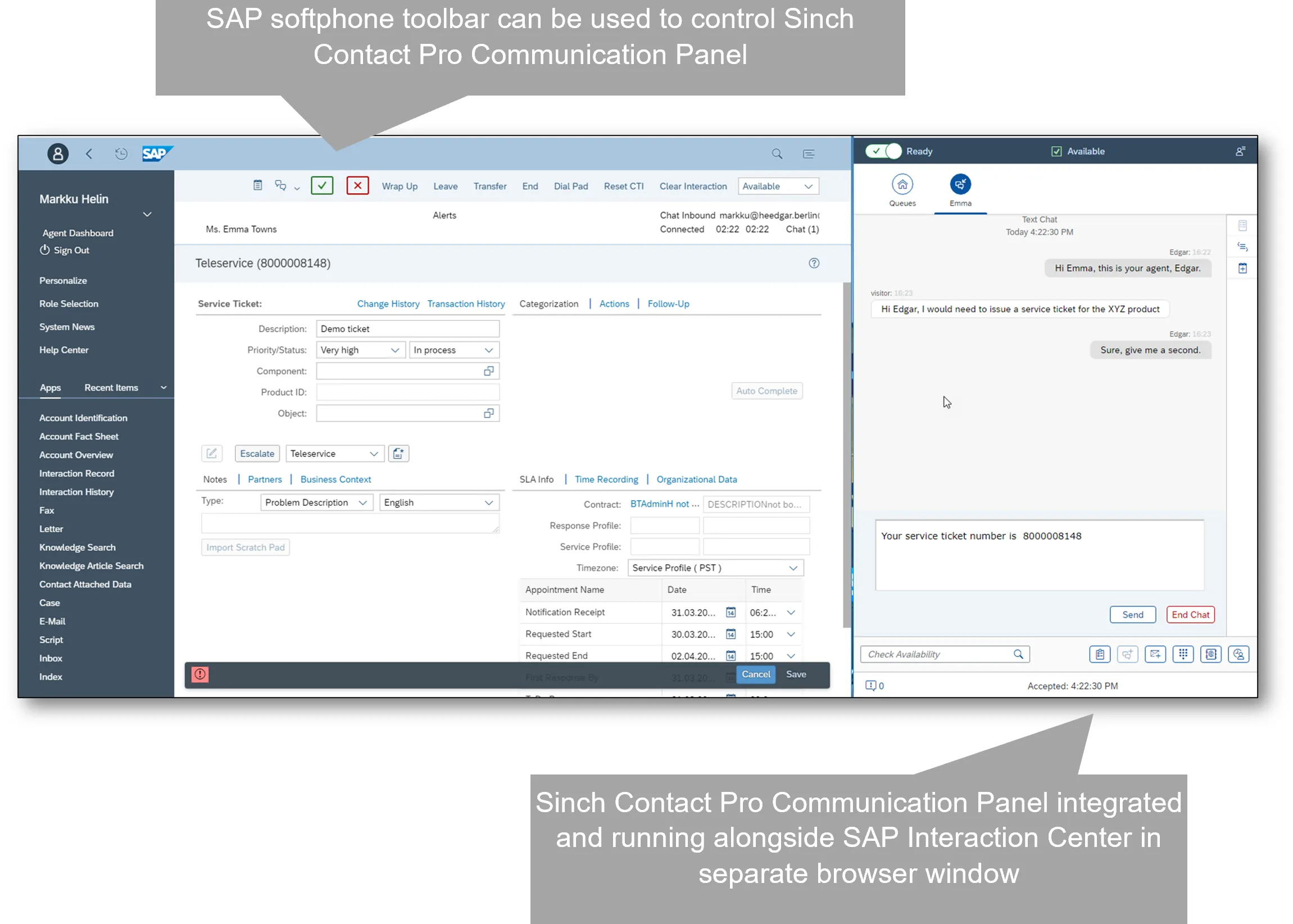
1Trust Package form Comtrust is a perfect example, when a customer calls, the agent can identify the customer and access relevant information in the CRM environment. Interaction data can be stored and associated with the customer record. For salespeople, the system automatically offers outbound calls and, similarly, presents the customer’s details. Agents and salespeople can also work with service tickets and leads without leaving their working environment. This reduces repetitive data entry and helps agents spend more time solving customer problems and sell more. Moreover, the data is error-free and always up-to-date because it is automatically and immediately transferred to customer cards.
Sinch Contact Pro integrated with SAP Success Factors Employee Central Service Center (ECSC)
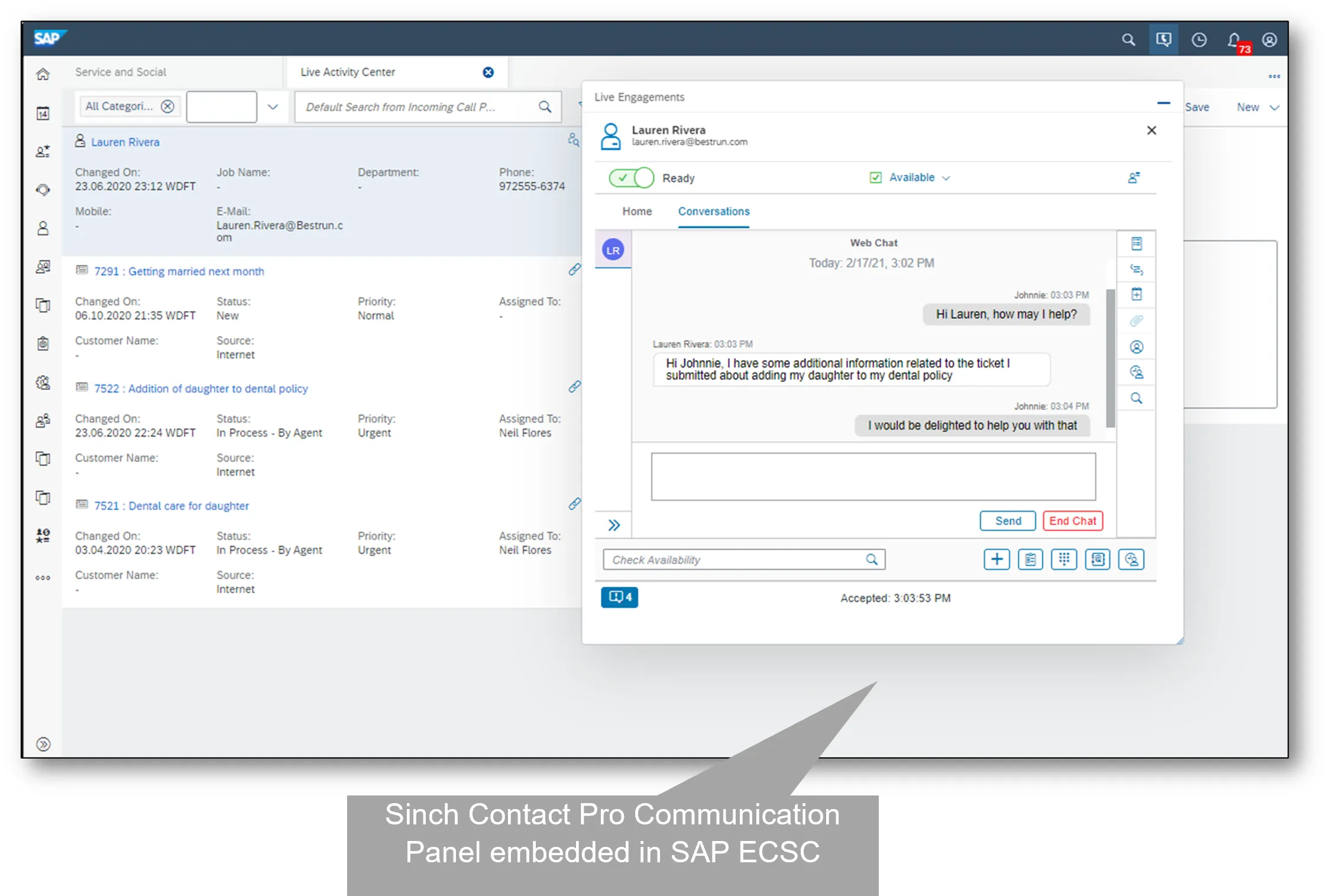
Sinch Contact Pro brings phone, email, web chat, video, SMS and messaging applications such as WhatsApp, Facebook Messenger and Viber into an omnichannel Contact Center environment. Regardless of how customers come to the organization, they will always receive the same high level of service
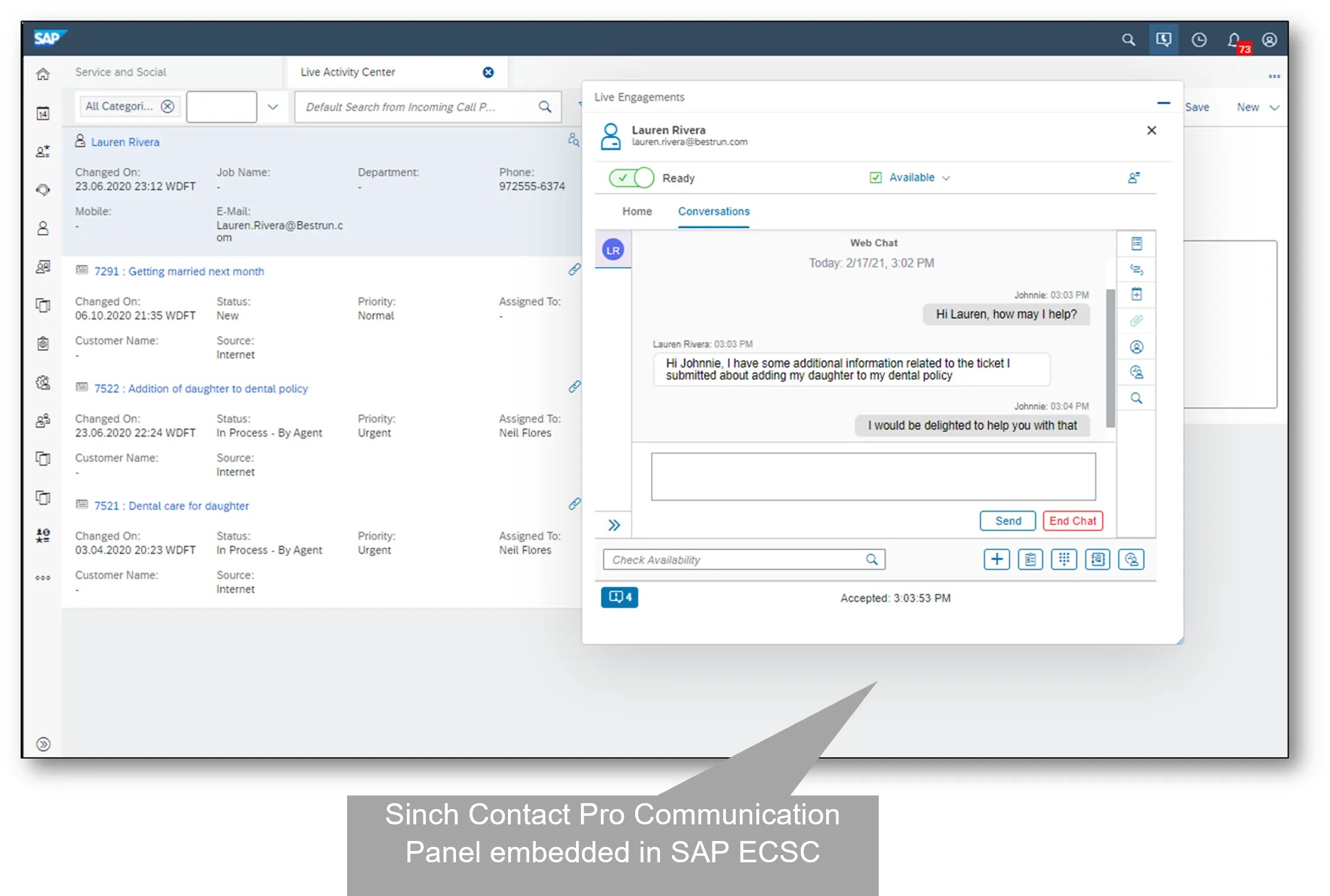
Sinch Contact Pro embedded in SAP Service Cloud (C4C)
Key benefits of Contact Center CRM integration
For organizations considering business systems (like SAP) and Contact Center integration, the main advantages are in the following areas:
- One customer view
Agents and reps can access customer information and interaction history without searching across disconnected systems. - 25-30% faster customer service
Routing, customer identification and access to relevant information can reduce unnecessary handling time and help agents resolve requests faster. Part of their job is moved to AI agents. - Omnichannel communication
Phone, email, chat, SMS and messaging apps can be managed as part of a connected customer experience in both outbound and inbound communications. - Marketing conversion improved 40-60%
Marketing campaigns are precise and personalized, fully tailored to individual customer needs (channel, time, offer) and if customers interested in a promotion they can easily communicate with an expert advisor.
- Higher sales
Various dial modes call scripts, message templates, and channel linking – all streamline the sales teams workflow. Sales agents can enter campaign notes, update customer information, upsell, and maintain conversations regardless of the channel.
- Greater efficiency and reliable data
Contact data automatically feeds the business system, eliminating errors and delays. CRM can be embedded in the Contact Center, or vice versa – the Contact Center can be embedded within the CRM. The goal is to handle as many first-contact requests (FCR) as possible. Interestingly, simply implementing Skills-Based Routing and Preferred Agent Routing can increase FCR by 25%.
- Lower costs
Higher efficiency translates into lower operating costs. Thanks to workflow optimization, automated data entry, and AI agent service, significantly fewer people are needed to handle the same volume of contacts. Customer service costs are reduced by between 30% and 50%.
What should companies consider when integrating a Contact Center with CRM?
Successful integration combines the needs of business processes and the technological possibilities of their implementation. Companies should identify which customer data agents need, which interactions should be recorded, how service tickets and leads are handled, and which channels customers actually use (and will use it the future).
Technical architecture is equally important. It allows the creation of complex processes and workflows, and enhances security and scalability.
Omnichannel customer service and sales in one environment
Call Center and CRM integration is more than connecting a contact and business system together. It is about creating a unified customer service environment where conversations and customer information work together. That’s what’s happening. Customers increasingly move between channels. A conversation might begin with a phone call, continue by email, and finish through chat or WhatsApp. An effective Contact Center therefore needs to maintain context across these interactions.
For organizations using SAP, Sinch with out-of-box integration can provide a foundation for modern, scalable and omnichannel customer service and financial and infrastructure savings: up to 30% reduction in total cost of ownership (TCO): Because Sinch Contact Pro (previous SAP Contact Center) is natively integrated into SAP.
FAQ
What is Contact Center and CRM integration?
Integracja Contact Center i CRM łączy kanały komunikacji z klientem z systemem CRM, dzięki czemu informacje o kliencie, historia interakcji, zgłoszenia serwisowe, leady i inne istotne dane są dostępne w jednym, zintegrowanym środowisku. Zamiast przełączać się między oddzielnymi aplikacjami, agenci i handlowcy uzyskują potrzebnych informacji wraz z nawiązanym połączeniem (kontaktem).
What is the difference between a Contact Center and a CRM?
A CRM primarily manages customer and business information, such as customer records, leads, opportunities, orders and service cases. A Contact Center manages customer communications across channels such as phone, email, chat and messaging. Integration connects these two functions so communication and business data work together.
Why should companies integrate a Contact Center with SAP?
Business systems such as SAP S/4HANA, SAP Customer Experience (CX) and SAP CRM contain important customer and business data. Integrating the Contact Center with SAP connects this data with real-time customer conversations. This helps organizations create more efficient service and sales processes, improve data quality and provide employees with a complete customer view.
What are the main benefits of CRM and Contact Center integration?
The main benefits include a 360-degree customer view, faster customer service, omnichannel communication, automated CRM updates, improved data quality, higher employee productivity and lower operating costs. Integration can also help sales teams work more efficiently with leads, campaigns and customer information. When a customer contacts a company, the agent can identify the customer and immediately access relevant information such as previous interactions, service requests, orders or other CRM data. The customer does not have to repeatedly explain their situation, while the employee can provide a more personalized and contextual response.
What is a 360-degree customer view?
A 360-degree customer view means that relevant customer information is available in one connected environment. It can include customer identity, contact details, previous conversations, service tickets, orders, leads and other business information. This gives agents and sales representatives a more complete understanding of the customer. Maximum value is delivered thanks to CRM and Contact Center integration.
Which communication channels can be integrated into a CRM?
A modern omnichannel Contact Center can connect with CRM dozen channels such as voice, email, web chat, SMS, WhatsApp and other messaging applications. The objective is to maintain customer context across channels in/outbound so that the customer receives a consistent level of service regardless of how they communicate.
Can Contact Center and CRM integration support sales?
Yes. Integration can support both inbound (customer service support, interest generated by marketing campaign) and outbound sales processes (lead generation and up/cross selling campaigns). Sales representatives can use customer information, campaign data, call scripts, automated dialing, message templates and interaction history. This allows sales teams to scale and personalize conversations, follow up on leads and identify upselling and cross-selling opportunities.
How does contact center integration reduce manual data entry?
When the Contact Center and CRM are integrated, interaction and contact information, and call recordings, and conversation transcripts can be transferred automatically to the relevant customer record in CRM. This reduces repetitive data entry, minimizes the risk of errors and helps ensure that customer information is updated quickly. Accurate data is essential for analytics and handling potential complaints.
How can Contact Center integration improve First Contact Resolution (FCR)?
Agents can resolve more requests during the first interaction when they have immediate access to customer information, previous interactions and relevant service data. Skills-Based Routing and Preferred Agent Routing can also help connect customers with the employee best equipped to handle their request.
Can AI be used with Contact Center?
Yes. AI can support Contact Center operations through automation, intelligent routing, AI-assisted service and other functions. By combining AI capabilities with CRM data, organizations can automate routine tasks while giving employees better information for more complex customer interactions. Artificial intelligence supports customers interactions analysis, can detect keywords, suggest the best solutions to agents, and prepare message templates.
Can Contact Center be embedded into SAP business aplications ?
Yes. Depending on the architecture and integration approach, the CRM experience can be embedded into the Contact Center environment, or Contact Center functionality can be embedded into the CRM. The objective is to give employees access to the systems and information they need without unnecessary application switching.
How do Contact Center and SAP business application integration affect the user?
Depending on the architecture and integration approach, the SAP interface (CRM/ERP) can be embedded into the Contact Center, or Contact Center functionality can be embedded into the SAP Interaction Center panel. In the first case, the Contact Center is the primary panel visible to agents and the main system they use. In the second case, all Contact Center data – such as agent availability and queues – is visible directly within SAP. Agents can answer calls and connect with a single button, where only the icon changes (e.g., from a phone to an email). The goal is to provide seamless access to both systems and information without compromising application usability.
What is Sinch Contact Pro, and why is it the best solution for the SAP environment?
Sinch Contact Pro is a cloud-based and on-premise omnichannel contact center solution that allows businesses to manage customer interactions across voice, email, chat, SMS, and social messaging apps from a single interface. It was originally developed as SAP Contact Center (SAP BCM) and is now provided by Sinch. It is premium-certified and endorsed by SAP (SAP Endorsed App), ensuring reliable, deeply tested integration with SAP ecosystems. Sinch Contact Pro connects seamlessly with platforms like SAP Service Cloud, SAP CRM/CX, SAP S/4HANA, and SAP SuccessFactors. Agents using SAP can handle calls, live web chats, and messaging apps (like WhatsApp) inside a floating browser-based widget (Communication Panel) directly on top of their SAP interface without switching screens.
Is SAP and Sinch Contact Pro integration suitable for large international organizations?
Yes. A connected Contact Center can support organizations operating across multiple countries, teams and customer service locations. Centralized customer information, standardized processes, multilanguage and omnichannel communication and analytics can help create a more consistent customer service operation while allowing organizations to scale.
Autor:
Joanna Pytlakowska
VP Sales & Marketing, Comtrust
Dowiedz się, jak klienci korzystają z naszych produktów i usług. Zapraszamy do kontaktu!


Produkty
SAP Customer Experience
SAP Field Service Management
SAP Conversational AI
SAP Intelligent Robotic Process Automation
Sinch Contact Pro
Infrastruktura VoIP
1trust Service
Usługi
Wdrożenia
Zarządzanie projektami
Integracje i pomoc techniczna
O nas
O firmie
Partnerzy i technologie
Aktualności