
RCS Chat on Your Phone: What You Need to Know
RCS (Rich Communication Services) is the next evolution of SMS and MMS. It works within your phone’s default messaging app, so there is no need to install additional software. In addition to plain text, RCS supports high-quality photos and videos, interactive buttons, product carousels, and forms. It also provides delivery and read receipts, making conversations more interactive and transparent. There is one important requirement: both the sender’s and recipient’s devices, as well as their mobile carriers, must support RCS for the service to work as intended. When RCS is available, messages appear directly in the default messaging app, giving conversations the look and feel of a modern instant messaging service.
For businesses, one of RCS’s most valuable features is the verified sender profile. Recipients can see the company’s name, logo, and verification indicator, helping them identify legitimate businesses and reducing the risk of phishing and impersonation.
In this article, we explain what RCS messaging is, why businesses are adopting it, and whether it is likely to replace SMS.
Key information at a glance
- RCS (Rich Communication Services) is a mobile messaging standard designed to succeed SMS and MMS. It works within a compatible default messaging app, so no additional downloads are required.
- Internet connectivity and device compatibility are essential. RCS requires an internet connection via Wi-Fi or mobile data and support from both the user’s device and mobile carrier.
- RCS offers more than traditional text messaging. It supports high-quality photos and videos, call-to-action buttons, product carousels, forms, quick replies, delivery and read receipts, and typing indicators.
- Verified sender profiles help businesses build trust. By displaying a company’s name, logo, and verification indicator, they help recipients identify legitimate senders and reduce the risk of phishing and impersonation.
- RCS is unlikely to replace SMS completely in the near future. SMS remains widely available, while RCS adoption depends on device and carrier support. Where supported, messaging platforms may automatically fall back to SMS if RCS is unavailable, provided this feature is enabled.
What is RCS Chat?
RCS (Rich Communication Services) is the next generation of mobile messaging, designed to replace traditional SMS and MMS. It transforms basic text messages into rich, interactive conversations by supporting multimedia content, action buttons, product carousels, maps, file sharing, and much more—all within your phone’s default messaging app.
Unlike SMS, RCS uses an internet connection (Wi-Fi or mobile data), unlocking a range of advanced features, including:
- High-quality photo and video sharing
- Call-to-action buttons
- Interactive product carousels
- Quick replies and forms
- Delivery and read receipts
- Typing indicators
- Verified business profiles with company branding
- Two-way conversations with businesses
For users, the experience is seamless. If both their device and mobile carrier support RCS, messages are delivered automatically through the native messaging app – no additional downloads or installations are required.
In short, the difference between SMS and RCS:
|
Feature |
SMS |
RCS |
|
Content |
Up to 160 characters, text only |
Text, images, videos, carousels, forms |
|
Interaction |
None |
Action buttons, quick replies, AI agent integration |
|
Sender |
Phone number or text-based alias |
Verified profile with company name and logo |
|
Confirmations |
Delivery (depends on the carrier) |
Delivery and read status, typing indicator |
|
Requirements |
Mobile network coverage |
Internet access, plus RCS support on the device and by the carrier |
|
Coverage |
Practically full |
Growing; depends on the device and carrier |
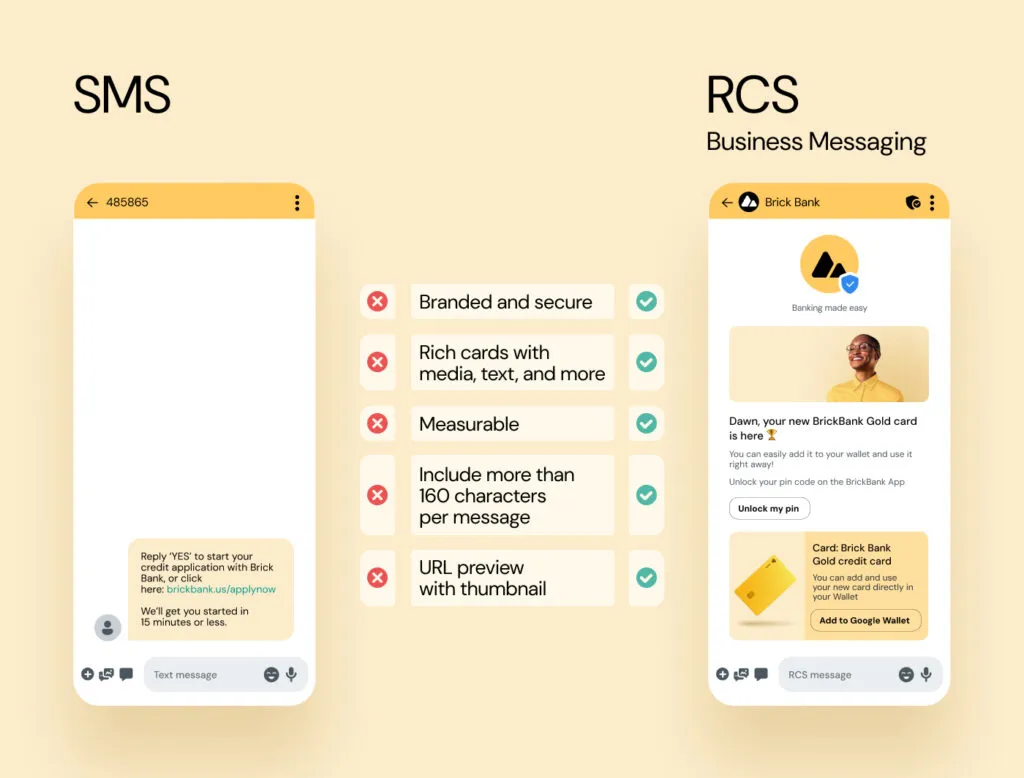
SMS and RCS offer customers different experiences when they’re communicating with businesses.
Źródło: sinch.com
Why do businesses choose RCS?
One of the biggest advantages of RCS for businesses is the verified sender profile. Customers can immediately see the company’s name, logo, and verification badge, making it much easier to distinguish legitimate messages from phishing attempts and building trust from the very first interaction. Beyond security, RCS creates far more engaging customer experiences than traditional SMS. Businesses commonly use RCS for:
- Customer support
- Marketing campaigns and promotional offers
- Appointment confirmations and reminders
- Order updates and delivery notifications
- Customer surveys and feedback requests
Interactive features allow customers to take action with a single tap – whether that’s purchasing a product, requesting more information, chatting with a virtual assistant, or connecting with an AI agent or call center.
Will RCS replace SMS?
Although SMS has significant limitations – including its 160-character limit, lack of branding, and absence of read receipts – it isn’t disappearing anytime soon.
Instead, SMS and RCS complement each other. SMS continues to offer nearly universal reach, while RCS delivers a richer, more interactive customer experience whenever it’s supported.
Modern messaging platforms automatically choose the best available channel, sending messages via RCS when possible and seamlessly falling back to SMS when necessary. This approach ensures maximum delivery rates while providing the best possible user experience.
Is RCS worth implementing?
If your goal is to drive customer engagement, RCS is a powerful addition to your communication strategy. Rich, interactive messages make it easier for recipients to respond, click, and convert.
RCS is particularly valuable for businesses looking to:
- Increase marketing campaign performance
- Deliver better customer service
- Simplify the customer journey
- Improve click-through and conversion rates
- Modernize their mobile communications
RCS represents the natural evolution of mobile messaging. It combines the simplicity and reliability of SMS with the rich functionality people expect from today’s messaging apps.
By using RCS alongside SMS, businesses can maximize their reach while creating more engaging customer experiences, building stronger relationships, and achieving better campaign results.
Want to discover how RCS can benefit your business? Get in touch with our team and learn how to make the most of next-generation mobile messaging.
Frequently Asked Questions About RCS
Is RCS chat free?
For individual users, RCS messages are generally not charged at SMS rates. Instead, they use an internet connection and consume mobile data when sent over a mobile network. When connected to Wi-Fi, they typically incur no additional messaging or mobile data charges. For businesses, RCS is a paid messaging service, with pricing typically based on the message, conversation, or campaign, depending on the provider and billing model.
Which phones support RCS chat?
RCS is supported on compatible Android devices using Google Messages and on iPhones running iOS 18 or later, where carrier support is available. Compatibility also depends on the mobile operator and, in some cases, the region. If RCS is unavailable, messages may be sent as SMS or MMS instead, provided the relevant fallback option is enabled.
How does RCS differ from WhatsApp or Messenger?
While the range of features is similar, RCS operates within the default Messages app and does not require the recipient to install any additional software or create an account. For businesses, this means they can reach customers without needing to know which messaging app they use. Furthermore, the sender’s profile in RCS is verified—a feature not provided by standard accounts on other messaging platforms.
Can RCS chat be disabled?
Yes. RCS can be disabled in the messaging app’s settings. Once it is turned off, conversations can revert to SMS or MMS. For step-by-step instructions, see our separate article: RCS Chat: What is it and how do you turn it on or off?
Author:
Joanna Pytlakowska
VP Sales & Marketing, Comtrust



Dowiedz się, jak klienci korzystają z naszych produktów i usług. Zapraszamy do kontaktu!


Produkty
SAP Customer Experience
SAP Field Service Management
SAP Conversational AI
SAP Intelligent Robotic Process Automation
Sinch Contact Pro
Infrastruktura VoIP
1trust Service
Usługi
Wdrożenia
Zarządzanie projektami
Integracje i pomoc techniczna
O nas
O firmie
Partnerzy i technologie
Aktualności